Vehicle health check software for UK garages
Updated 10 November 2026
Vehicle health check (VHC) software lets a mechanic record the state of each part of a car on a phone, tablet or computer, rated green, amber or red, with a note, photos and, where work is needed, a price to fix, so the customer can see what was found and decide what to have done. In Motion Bookings the health check is part of the job card on every plan, and on Pro+ your customers can approve or decline each recommended repair online in your customer portal.
Each check is filed with the job it was done on, so it is there when you price the work, raise the invoice or the customer rings back about it.
What a digital vehicle health check is
A vehicle health check is an inspection done while the car is in for its booked work: brakes, tyres, lights, suspension, fluids and the rest. A paper sheet tends to stay in the workshop. A digital check can be shown to the customer, printed, and kept with the job.
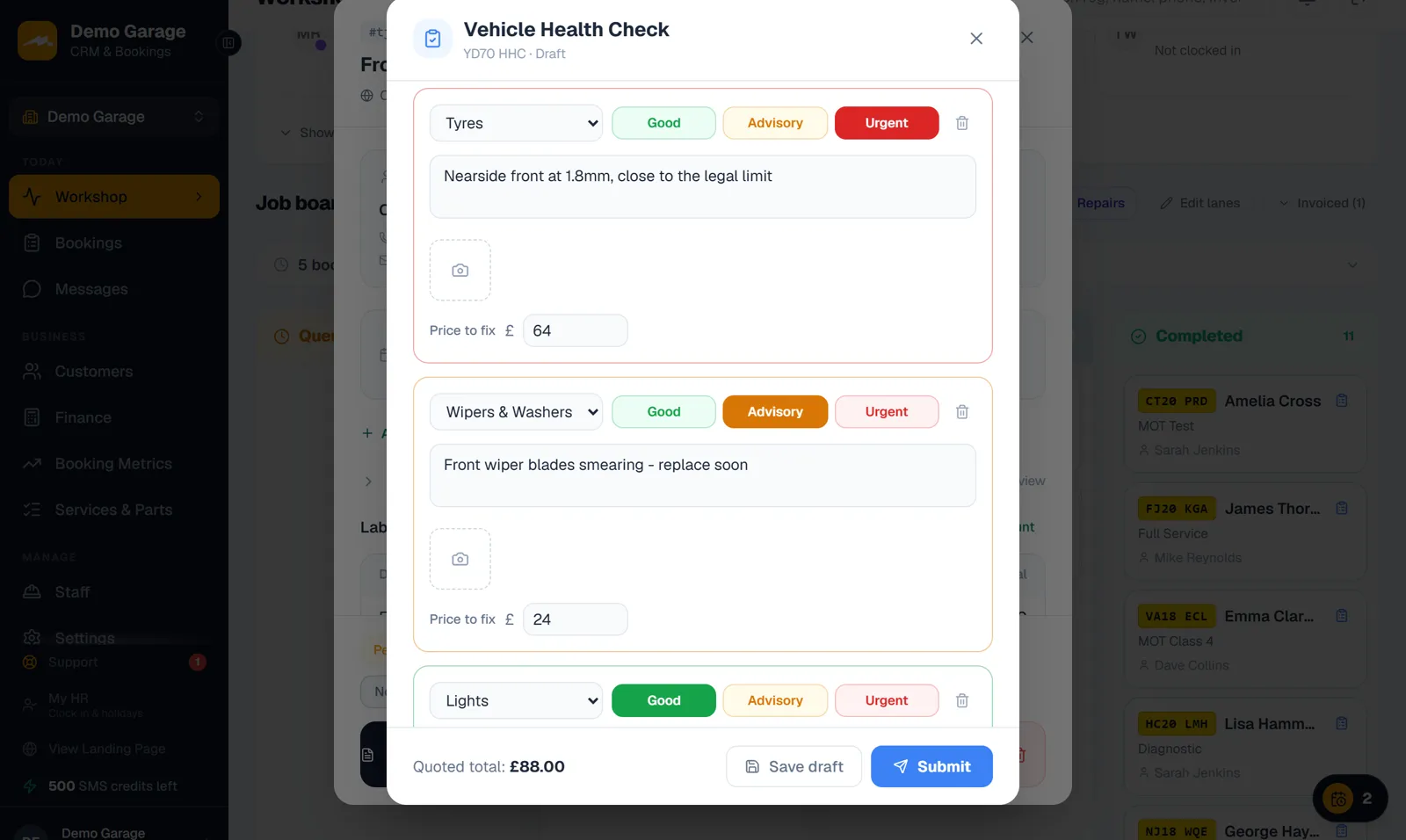
The colours follow the usual garage convention: green ("Good") for an area that is fine, amber ("Advisory") for something to keep an eye on or plan for, and red ("Urgent") for work that needs doing now.
How a health check works in Motion Bookings
Open the check from the "Health Check" button on the job card, from the job's card on the Workshop board, or from a mechanic's own screen while they are clocked in. Each line is one area of the car: pick the area, press "Good", "Advisory" or "Urgent", and type what you found. On a phone or tablet the camera button opens the camera; on a computer it picks a photo file. "Advisory" and "Urgent" items take a price to fix, and the check adds those up as a quoted total.
"Save draft" keeps the check while the car is still on the ramp. "Submit" marks it as sent to the customer, and needs the job to be linked to a customer record.
- Twelve areas to choose from: Brakes, Tyres, Suspension, Steering, Exhaust, Lights, Engine, Battery, Fluids, Wipers & Washers, Bodywork and Other
- Photos in JPG, PNG, WebP or GIF up to 20 MB each, made smaller before upload and kept in private storage
- A price to fix on each amber and red item, with the quoted total at the foot of the check
- One check per job, which you can open and change again until the customer has answered
Templates for the checks you do on every car
If you run the same inspection every time, such as a 30-point check, build its list of areas once and save it as a template from the "Templates" button on the check. Applying a template adds every area on it already marked "Good", so the mechanic only changes the items that need attention. Templates are saved for your garage, so every mechanic works from the same list.
What your customer sees
On Pro+, with your customer portal switched on, the customer signs in and finds the check on the "Bookings" tab of their portal. Each "Advisory" and "Urgent" item shows its note, its photos and its price, with "Approve" and "Decline" buttons. The areas that passed are listed together as checked and healthy. A running total shows what they have approved so far, and "Submit response" works once every item has an answer.
The customer can only give their decision: your findings and prices stay as the mechanic recorded them. Once they respond, the check is locked and your side shows "Customer responded", with approved or declined against each item. Every report stays in their portal to view and print.
Motion Bookings does not text or email the customer to say a check is waiting, and does not alert you when they answer. Let them know yourself, with a call or a text from "Send SMS" on the job card, and look at the job for their decisions. A customer without a portal login can be invited from their customer record: email the invite from your own connected inbox, or copy the invite link and send it to them.
Approved work and the invoice
A health check is filed with the job. It is not added to the bill by itself: when a customer approves an item, add that work to the job's "Labour & Parts" before you invoice, or book it in as a new job. In the Invoices list, a "Health" button sits beside the invoice of any job that has a check, so the two can be opened side by side.
Advisories you want printed on the customer's bill can also go in the job's "Advisories" notes, which print on the invoice. How a finished job becomes an invoice is covered on our garage invoicing software page.
Print it or save it as a PDF
"Print / PDF" on the check opens your browser's print window with a report of every item: its area, rating, findings, price and the customer's decision, with the advised and approved totals at the foot. Print it at the desk, or choose "Save as PDF" in the print window.
Customers with a portal login can open the same check as a report with your garage name and logo, the reg and the date, and print or save it themselves.
Which plan includes vehicle health checks
The garage side of the health check is on every plan. Approving or declining items online needs the customer portal, which is part of Pro+.
Swipe the table sideways to see all 4 columns.
| Feature | Starter, £39 | Pro, £89 | Pro+, £149 |
|---|---|---|---|
| Health checks on the job card: ratings, notes, photos and prices | Yes | Yes | Yes |
| Your own templates, printing and PDF | Yes | Yes | Yes |
| Customer approves or declines each item in your portal | No | No | Yes |
| Texting the customer with "Send SMS" | No | Yes | Yes |
The 14-day free trial needs no card and includes every Pro+ feature, so you can try portal approvals before you pick a plan: start a free trial. Everything else each plan includes is on the pricing page.
Limits to know before you start
Health checks are one part of Motion Bookings, which also runs your diary, workshop board, MOTs and invoices: see garage management software for the whole system.
- The customer is not told automatically that a check is waiting, and you are not alerted when they answer.
- Approved items do not become invoice lines by themselves: add the work to the job.
- Online approval needs Pro+, the portal switched on and a portal login for that customer.
- It runs in the web browser on phones, tablets and computers. There is no app to install from an app store.
Frequently asked questions
Is the vehicle health check included on every plan?
Yes. Mechanics can do health checks with ratings, notes, photos, prices and templates on Starter, Pro and Pro+, and print them or save a PDF. Customers approving or declining items online needs the customer portal, which is part of Pro+.
How does the customer approve the work?
Through your customer portal, on Pro+. They sign in, see each "Advisory" and "Urgent" item with its note, photos and price, press "Approve" or "Decline" on each one, then "Submit response". They cannot change your findings or prices.
Do approved items go onto the invoice automatically?
No. The check is filed with the job and shows the customer's decisions, but it does not add lines to the bill. Add the approved work to the job's "Labour & Parts" before you invoice.
Can the mechanic take photos on their phone?
Yes. On a phone or tablet, each item's camera button opens the camera; on a computer it picks a photo file. Photos are made smaller before upload and kept in private storage.
Does Motion Bookings tell the customer their health check is ready?
No, not by itself. Once you press "Submit", the check waits in their portal (on Pro+), so let them know with a call or a text from the job card.
Can I set up my own checklist?
Yes. Build the list of areas once and save it as a template, such as a 30-point check. Applying it adds every area marked "Good", so the mechanic only changes what needs work.
Keep reading
Show customers what you found
Start your 14-day free trial - no card required.
Start your 14-day free trial