Motasoft alternative: how Motion Bookings compares with VGM
Updated 11 November 2026
Motion Bookings is a Motasoft alternative for independent UK garages: online booking with deposits paid into your own Stripe account, a 14-day free trial you start yourself with no card, and published plans from £39 a month for one location. Motasoft's Virtual Garage Manager (VGM) does more in some areas, such as accounts and parts supplier links and phone support, so this page sets out both sides.
This page is written by the makers of Motion Bookings, so bear that in mind; every fact about Motasoft links to Motasoft's own site, checked on 10 November 2026. Some of its pages disagree with each other, so check them and your own order form before you decide, and see our comparison of six UK garage management systems for a wider view.
At a glance
| Feature | Motion Bookings | Motasoft (VGM) |
|---|---|---|
| Published monthly price | £39 Starter, £89 Pro, £149 Pro+, for one location; extra locations £49 (Pro) or £75 (Pro+) | £55, £85, £110 with MotasoftPay; £65, £95, £149 without; ex VAT Source, as checked 10 Nov 2026 |
| Free trial | 14 days, no card, start it yourself | Free demo; no trial stated on their site Source, as checked 10 Nov 2026 |
| Set-up fee | None | None (free set-up) Source, as checked 10 Nov 2026 |
| Minimum term | None on monthly plans; a yearly plan is paid for the year ahead, with no refund if you cancel | Pages differ; terms: as your order form says, 90 days' notice Source, as checked 10 Nov 2026 |
| Per-user charge | None, unlimited staff logins | None, unlimited users Source, as checked 10 Nov 2026 |
| Texts included each month | None on Starter, 200 on Pro, 500 on Pro+ | 100 on every plan Source, as checked 10 Nov 2026 |
| Customer online booking | Every plan; requests you confirm | Every plan Source, as checked 10 Nov 2026 |
| Payment when a customer books online | A deposit, or the full price of a VAT-free service such as the MOT, into your own Stripe account | PayPal; MotasoftPay at booking coming soon Source, as checked 10 Nov 2026 |
| MOT reminders | Text only, Pro and Pro+ | Email and text Source, as checked 10 Nov 2026 |
| Vehicle health checks | Every plan; online approval on Pro+ | VGM Complete only Source, as checked 10 Nov 2026 |
| Accounting software link | None; CSV export on Pro+ | Direct Xero link; Sage 50 and QuickBooks by export Source, as checked 10 Nov 2026 |
| Making Tax Digital VAT returns | Yes, sent from VGM Source, as checked 10 Nov 2026 | |
| Parts ordering from suppliers | GSF and NAPA Source, as checked 10 Nov 2026 | |
| Support | In-app chat for owners and managers, and email (maciejmymotion@gmail.com); no phone line | UK phone and chat, Monday to Friday Source, as checked 10 Nov 2026 |
| Bringing your data in | CSV import you run yourself | Imported free during set-up Source, as checked 10 Nov 2026 |
| Your data when you leave | The owner exports customers, vehicles, bookings, invoices and the text log as CSV files in one zip file, from Settings, while the plan is active | Made available for migration; may be erased 90 days after the contract ends Source, as checked 10 Nov 2026 |
Comparison reflects what Motion Bookings includes as standard. Other systems vary - always check the provider's current plans.
What Motasoft offers
Motasoft Ltd, based in Bristol and part of ClearCourse, was formed in 2006. Its cloud system, VGM, comes in three plans on its pricing page, all with free set-up and unlimited users:
- VGM Essential, £55 a month with MotasoftPay (its card payments service) or £65 without: invoicing and estimates, job cards, customer history, and MOT and service reminders.
- VGM Plus, £85 or £95 a month: adds Haynes technical data.
- VGM Complete, £110 or £149 a month: adds the technician app and vehicle health checks with photos and video (another Motasoft page, on the technician app, prices photos and video at £20 a month).
- Prices exclude VAT. Each plan includes 100 texts, 50 registration lookups and 100 postcode lookups a month, and more credits can be bought.
- Online booking that shows only your free slots and takes payment through PayPal; paying with MotasoftPay at booking is marked as coming soon.
- MOT reminders by email and text, using DVSA MOT history at no extra charge.
- A direct Xero integration, with Sage 50 and QuickBooks by export, and VAT returns sent to HMRC under Making Tax Digital.
- Parts from GSF and NAPA, tyres from GroupTyre, and card machines and payment links through MotasoftPay.
- UK phone and chat support, Monday to Friday, 09:00 to 17:30.
Motasoft contracts, notice and your data
Motasoft's pages give different answers on the contract. The pricing page says there is no fixed-term contract, the homepage FAQ describes a 12-month contract paid monthly by direct debit, and the workshop software page says one month's notice cancels.
Its full terms (version 6.0.0) set the minimum term in each customer's order, renew it for the same length (a year at most), and let either side end the contract at the end of a term with at least 90 days' written notice. When the contract ends, the terms say Motasoft makes your data available for migration and may permanently erase it after 90 days.
For comparison, Motion Bookings monthly plans have no minimum term, and a yearly plan is paid for the year ahead. Cancelling stops the next renewal: you keep the plan to the end of the period you paid for, and what you paid is not refunded (Terms, section 3). While your plan is active, the owner can export customers, vehicles, bookings, invoices and the text log as CSV files in one zip file, from Settings.
What switching from Motasoft involves
Most of the work is timing, and our guide to switching garage software has more detail. A sensible order:
- Read your order form for the minimum term and the last day you can give notice.
- Ask Motasoft early for your customers, vehicles and MOT due dates as a CSV file. The format of the data it hands over when you leave is not stated on its site, but its reports page says any report you can run can be exported as a CSV, so you can save your own lists first.
- Start the Motion Bookings free trial, import the file (see below) and set up your services, prices, opening hours and staff logins.
- Connect your own Stripe account if you want deposits, and put your booking link on your website and Google Business Profile.
- The import brings in customers, one vehicle each and MOT due dates, not bookings or invoices, so add future bookings to the new diary by hand and keep your Motasoft export for past invoices.
- Give written notice by the date your order form sets, and download your data again before the account closes.
How Motion Bookings differs
Both cover bookings, job cards, invoices with VAT, MOT reminders and health checks. These differences hold today:
- A 14-day free trial you start yourself, with every Pro+ feature and no card, where Motasoft offers a free demo.
- Online booking on every plan, taking a deposit, or the full price of a VAT-free service such as the MOT, into your own Stripe account as the customer books, less card fees (see pricing). Bookings arrive as requests you confirm.
- Health checks with photos on every plan, with customer approval online on Pro+; VGM has them on Complete, in the technician app.
- A customer portal on Pro+ where customers book, see their invoices and MOT results and answer health checks; the only customer-facing portal Motasoft describes is its digital health check report.
Where VGM does more than Motion Bookings
- Accounts: VGM links directly to Xero and sends VAT returns to HMRC. Motion Bookings has no Xero, QuickBooks or Sage link and no Making Tax Digital submission; its Accounting page, on Pro+, exports a CSV for your accountant.
- Parts, tyres and technical data: VGM orders from GSF, NAPA and GroupTyre and includes Haynes data on Plus and Complete. Motion Bookings has no ordering through a supplier's system and no technical data.
- Payments after the job: MotasoftPay adds card machines and payment links. Motion Bookings takes card payments only when customers book online or order from your tyre shop page.
- Reminders: VGM sends MOT reminders by email and text. Motion Bookings' MOT reminders are text only, on Pro and Pro+.
- Support and set-up: VGM has UK phone and chat support, and Motasoft imports your data free during set-up when it is in a usable format. Motion Bookings has an in-app chat for owners and managers and email, no phone line, and you run the import yourself.
Moving your customers and MOT dates across
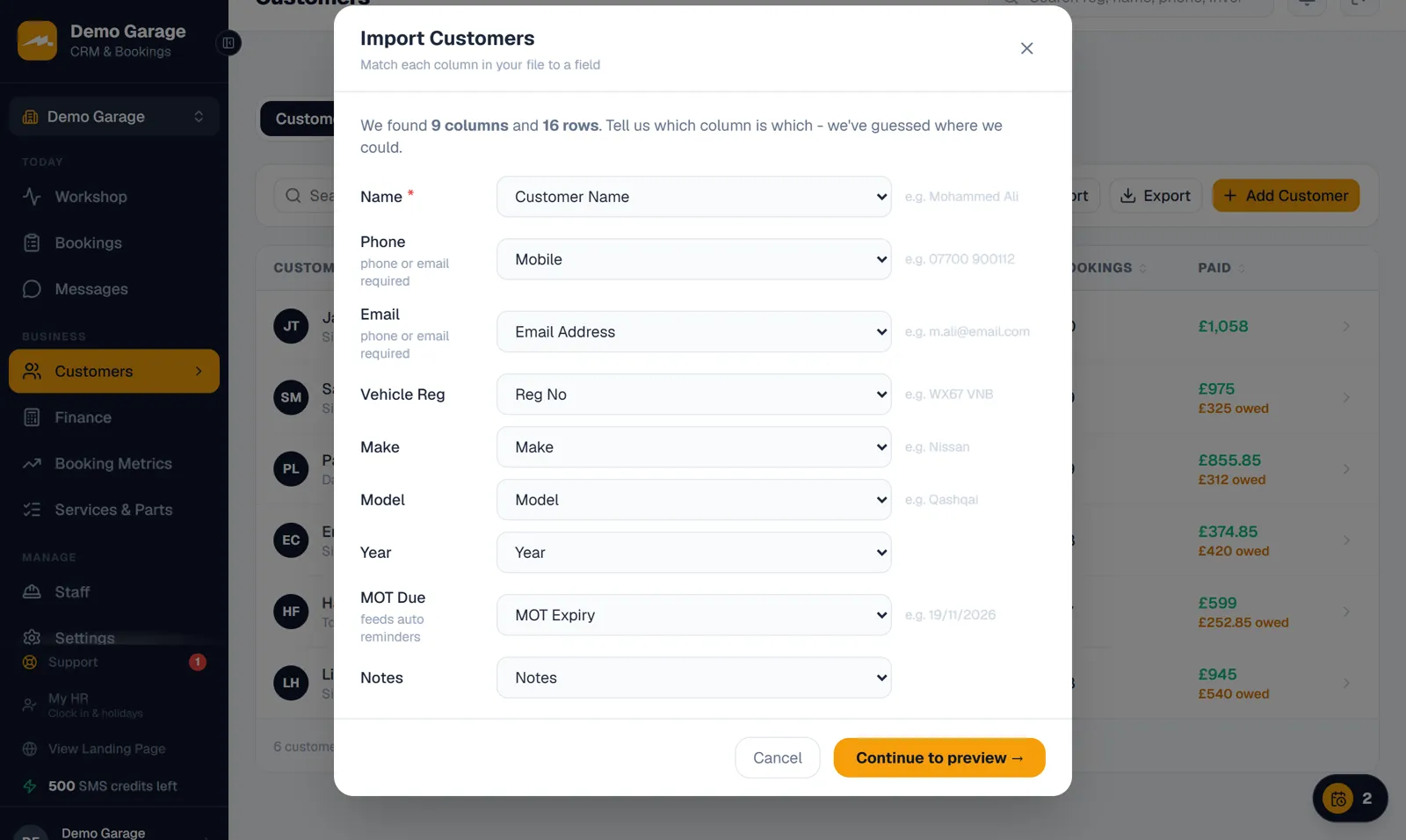
Motion Bookings imports customers from a CSV file on any plan, from the Customers page or the set-up wizard. Use its template (Name, Email, Phone, Vehicle Reg, Make, Model, Year, MOT Due, Notes) or your own file: it guesses the columns ("Mobile" or "Tel" for "Phone", "Registration" or "VRN" for "Vehicle Reg", "MOT Expiry" for "MOT Due") and you can change any match.
Each row needs a name and a phone number or email, and holds one vehicle. Rows whose phone number or reg is already on file are skipped as duplicates, and the last screen counts what came in, what was skipped and the reminders set up. Everyone comes in as a private customer.
MOT due dates can be written as 2026-09-30, 30/09/2026 or 30/09/26; a date the importer cannot read, such as 30-Sep-26 or a UK date with a time after it, is left blank. Each date becomes an MOT record, which is what MOT reminders work from: on a paid Pro or Pro+ plan with "Auto MOT reminders" switched on, a text goes out once the date is inside your reminder window (1 to 120 days before, 30 by default). On the trial they wait for you to send by hand, and a date already passed gets no reminder. The imported date covers the next MOT, and when the car passes it with you, the pass stores its next expiry, worked out from the imported date by GOV.UK's rule, and the following year's reminder is set up from it.
Prices, like for like
Motasoft's Essential plan includes 100 texts a month. Motion Bookings Starter (£39) includes none, so for a garage that texts its customers the fair match is Pro at £89 with 200 texts a month, or Pro+ at £149 with 500. Each Motion Bookings plan price is for one location; extra locations are £49 a month on Pro or £75 on Pro+ (Starter is one location). Extra Motion Bookings texts are recurring bundles of 100 for £12, 300 for £32 or 1,000 for £90 a month (£120, £320 or £900 a year), and all texts are one pool across your locations.
Motasoft's pricing page says its prices exclude VAT. No VAT is currently added to Motion Bookings' prices, so the price shown is what you pay.
If health checks are why you would pick VGM Complete, Motion Bookings has them on every plan. Every plan and add-on is on our pricing page.
Frequently asked questions
How much does Motasoft cost?
Motasoft's pricing page lists VGM Essential at £55, Plus at £85 and Complete at £110 a month with MotasoftPay, or £65, £95 and £149 without, excluding VAT (checked 10 November 2026). Some other Motasoft pages show a different figure, such as £50 a month, so go by the pricing page and your order form.
Does Motasoft have a minimum contract?
It depends on your order form. Motasoft's pricing page says there is no fixed-term contract and its homepage FAQ mentions 12 months, while its terms set the minimum term in each order and ask for at least 90 days' written notice before the end of a term.
How do I get my data out of Motasoft?
Ask Motasoft before your contract ends. Its terms say it makes your data available for migration when the contract ends and may permanently erase it after 90 days, and a feature page says it will package your data up and hand it to you. Ask for customers, vehicles and MOT due dates as a CSV file; any report you can run in VGM can also be exported as a CSV, its reports page says.
Will my MOT reminders carry on after I switch?
Yes for each MOT due date you bring across, on a paid Pro or Pro+ plan. The import turns each date into an MOT record, and with "Auto MOT reminders" switched on a text goes out inside your chosen window, 1 to 120 days before the due date. When the car passes its next MOT with you, the pass stores its next expiry, worked out from the imported date by GOV.UK's rule, and next year's reminder is set up from it. Motion Bookings does not send MOT reminders by email.
Does Motion Bookings link to Xero like Motasoft does?
No. Motion Bookings has no link to Xero, QuickBooks or Sage and does not send VAT returns; its Accounting page, on Pro+, exports a CSV of your invoices for your accountant. If a live Xero link matters, VGM has one.
Can I try Motion Bookings before I give Motasoft notice?
Yes. The 14-day free trial needs no card and no call, so you can import your customers and put real bookings through it while VGM is still running. Trial texts are limited to 50 from a shared number, and nothing is billed unless you choose a plan.
Keep reading
Try it on your own customer list
Import your customers and MOT dates into a 14-day free trial of every Pro+ feature. No card needed, and nothing is billed unless you choose a plan.
Start your 14-day free trial