An MOT booking system built around your MOT bay
Updated 11 November 2026
An MOT booking system takes MOT bookings, online and at your desk, only for times your MOT bay and tester can take, and puts each car on the tester's list ready for the test. In Motion Bookings you can set MOT hours apart from your opening hours and a hard limit on MOTs at the same time; the class is worked out from the reg, and the MOT fee can be taken in full when the customer books.
Everything here works on every plan unless it says otherwise. For how the booking page itself works, and how to put it on your website, see the garage online booking system page.
MOT hours apart from your opening hours
Your workshop may open at 8 while your tester works 9 to 3. "MOT Bookable Hours" sets the first and last time an MOT can be booked, on your own booking form and on your booking page. Repairs are not affected, and where your opening hours and MOT hours differ, the stricter of the two wins.
For the odd day, switch off "Take MOT bookings online" while your tester is away (other services stay bookable), or close the day for MOTs only, all day or from a time, from the diary.
How many MOTs one time can take
The MOT bay limit caps how many MOTs can overlap one time, from 1 to 20, while repairs stay unlimited. It is a hard stop for your team and for online bookings: with one bay set to 1, the bay cannot be double-booked. It is off until you turn it on.
An MOT on its own holds the bay for as long as it is booked, even once it is finished. Booked with other work, such as welding, it holds the bay only for the MOT itself, from its start time.
A softer setting, "Max concurrent MOTs", hides full MOT times online but only warns your team, who can still squeeze a car in. Customers see a full day plainly: "Our MOT bay is fully booked on this day".
MOT lengths by class, and MOTs on the hour
Each MOT is booked for the length of its class, which is what the bay limit counts. Change any class's time, or switch on "Same length for every MOT" and pick one time for all of them, from 15 to 90 minutes.
If your MOT takes the hour, switch on "Online MOTs on the hour only": online MOT customers can pick 9:00 or 10:00, not 9:30. Your team can still book any time in the diary, and other services keep their half-hour times.
| MOT class | Covers | Booked for |
|---|---|---|
| Class 1/2 | Motorcycles | 20 minutes |
| Class 3 | 3-wheeled vehicles up to 450kg unladen weight | 25 minutes |
| Class 4 | Cars up to 8 passenger seats, motor caravans, and goods vehicles up to 3,000kg design gross weight | 45 minutes |
| Class 4a | 9 to 12 passenger seats, with a seat belt installation check | 45 minutes |
| Class 5 | 13 or more passenger seats | 60 minutes |
| Class 5a | 13 or more passenger seats, with a seat belt installation check | 60 minutes |
| Class 7 | Goods vehicles over 3,000kg up to 3,500kg design gross weight (zero emission goods vehicles up to 4,250kg) | 45 minutes |
Classes as GOV.UK lists them on its MOT costs page (checked 10 November 2026). An MOT whose class is not known yet is booked as Class 4.
The MOT class from the reg
When a customer picks an MOT and types the reg, the page looks the car up with DVLA and DVSA, works out its class and says so ("This is a Class 4 MOT"). DVLA gives no seat count or design gross weight, so the class is a best guess from the type approval, wheelplan, weight, make and model. Class 3, 4a, 5 and 7 always come back marked as estimates, and the customer is asked to confirm with you. Class 5 needs 13 or more passenger seats and Class 7 a goods vehicle. A vehicle over 3,500kg is flagged for a check: a zero emission goods vehicle up to 4,250kg can still be a Class 7 MOT.
To price MOTs by class, set up a Smart MOT service with a price per class on the Services page, on any plan; the server works the price out again from your settings, never from the page. The job card's Smart MOT panel, where your team sees and changes the class, is on Pro and Pro+.
No second MOT for the same car
A car booked for its MOT twice, once by phone and once online, leaves a slot empty. So the page checks whether the car already has an MOT booked with you, today or later, that is not cancelled, a no-show or finished. If it has, the button is blocked, and the customer is told the day it is booked for and asked to call you if that is a mistake.
A finished MOT, pass or fail, never blocks, so a retest can always be booked. The server checks again before it writes anything.
Taking the MOT fee in full online
Switch deposits on, connect your own Stripe account and set your MOT service's deposit to 100% of its price on the Services page, and the customer pays for the whole MOT when they book. The page says "You pay for this now by card: £54.85." before the button, calling it paying in full, not a deposit; a Smart MOT is charged at the price for the car's class.
MOT test fees are always VAT-exempt on the bill, even if the service was set up with VAT by mistake; MOT repairs and MOT prep stay taxable. GOV.UK says the most a test centre can charge for a car is £54.85, and that no VAT is paid on the fee: see MOT costs on GOV.UK (checked 10 November 2026).
A paid MOT is not a booking until the money lands: until then it holds the time, bay and car, and nothing shows in your diary. The payment goes into your Stripe account, less card fees (see pricing), and Stripe emails its own receipt for a card payment. If nothing is added to the job, its invoice is raised already marked "Paid online" (more on garage invoicing). Paying up front is one of the steps in how to reduce no-shows.
The MOT test record your tester works from
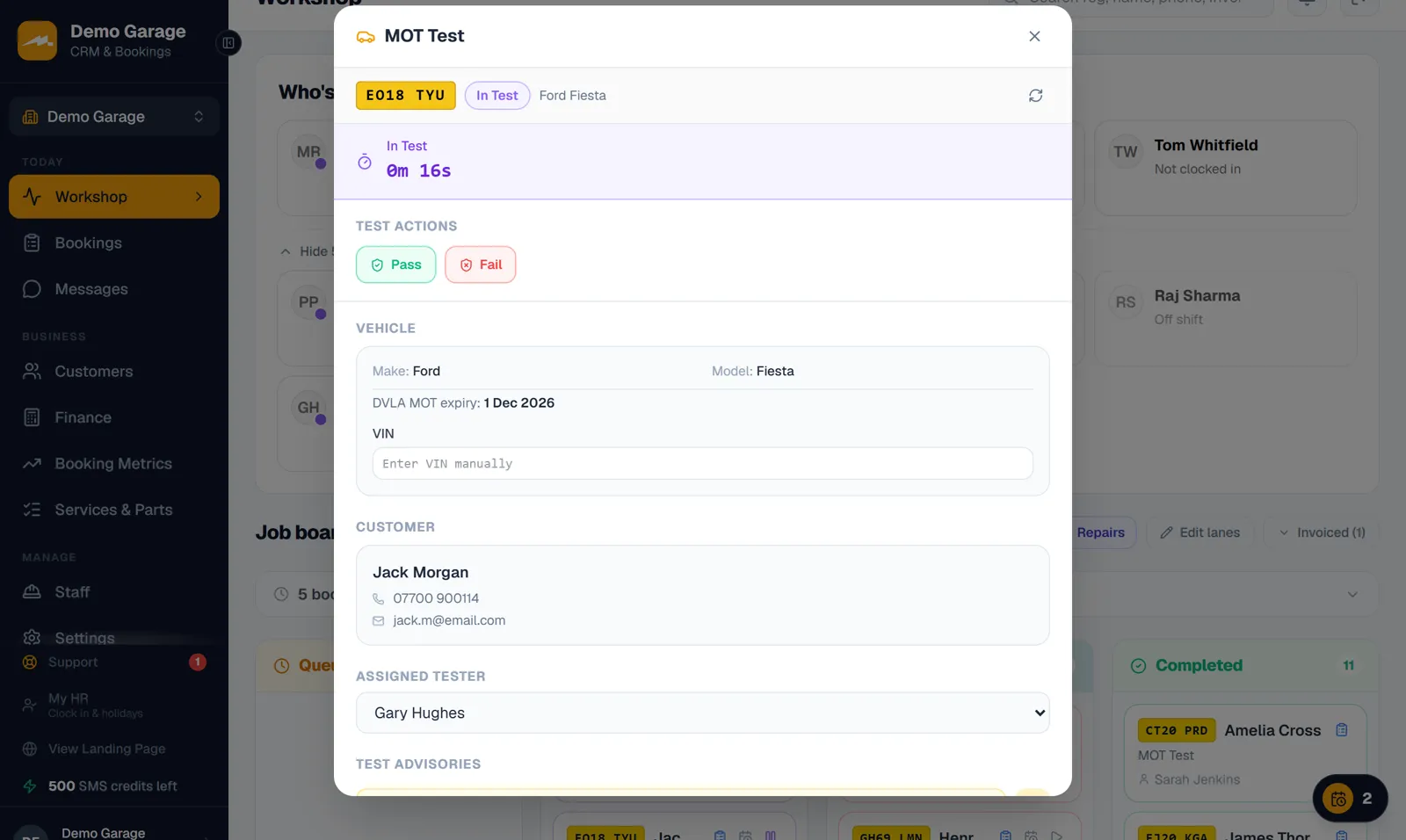
Every MOT booking gets an MOT test record linked to it, so it lands on the tester's list; an online MOT arrives unassigned for you to give to a tester. Owners run MOTs from the Workshop board and the job card's "MOT Test" tab, mechanic logins also have the MOT page, and a shared front desk or MOT computer opens the Workshop on MOTs only.
In the test the tester sees the car, the customer and a running timer, and records the pass or fail, failure reasons, advisories, their name and the test number. "Load DVSA history for this vehicle" brings in the car's past tests, and a printable MOT sheet lists the reasons and advisories for the customer.
Motion Bookings does not send anything to DVSA. Your tester still records the test on DVSA's own MOT testing service, as now.
Next year's MOT reminder
MOT reminders are texts on Pro and Pro+, sent 1 to 120 days before the MOT runs out (30 unless you change it), with your online booking link if you choose (2 credits instead of 1). More on the MOT reminder software page.
A reminder is sent from an MOT test record that holds an expiry date. A test made from a booking starts without one, and recording the pass stores the car's next expiry by GOV.UK's rule, worked out from the previous expiry Motion Bookings holds for the car, such as an imported MOT due date: tested up to a month (minus a day) before that expiry, a car keeps its renewal date; otherwise the new one is a year (minus a day) from the pass. With no previous expiry held, it is a year (minus a day) from the pass, which can be up to a month earlier than DVSA's date (never later when the test is recorded on the day it is done). "Refresh DVSA data" (the round arrow on the job card's "MOT Test" tab) pressed before the pass gives the test DVLA's current expiry, and pressed after it updates the date from DVSA's own record. Next year's reminder is set up from the date held. MOT due dates you import with your customers make records of their own.
Worth knowing when you pick the timing: GOV.UK says a car can have its MOT up to a month (minus a day) before it runs out and keep the same renewal date (when to get an MOT).
What it needs, and what it does not do
- MOT hours, the bay limit, MOT lengths, MOTs on the hour, the duplicate check, MOT test records and paying online work on every plan, from Starter at £39 a month for one location.
- The job card's Smart MOT panel and MOT reminder texts need Pro or Pro+.
- There is no list of MOTs due or overdue, and an MOT that has already run out is not reminded.
Frequently asked questions
Can customers book an MOT online when my tester is not in?
Not once you set "MOT Bookable Hours", which keep MOTs to your tester's times. For a day off, close the day for MOTs only, or switch off "Take MOT bookings online".
Will it stop two cars being booked into one MOT bay?
Yes, once you switch on the MOT bay limit and set it to 1: it is a hard stop for your team and online. It is off until you turn it on.
Can customers pay for their MOT online when they book?
Yes. Set the MOT service's deposit to 100% of its price, with deposits on and your Stripe account connected; with no VAT on the fee, that is the whole MOT.
Does it work out the MOT class from the number plate?
Yes, as a best guess from DVLA and DVSA data. A normal car comes back as Class 4; Class 3, 4a, 5 and 7 are marked as estimates to check.
Does Motion Bookings send MOT results to DVSA?
No. It reads vehicle details and MOT history, but your tester still records each test on DVSA's MOT testing service.
Will the customer get a reminder next year?
Yes on Pro and Pro+, with MOT reminders switched on: recording the pass stores the car's next expiry on its MOT test by GOV.UK's rule, worked out from the previous expiry Motion Bookings holds for the car, and next year's reminder is set up from it. With no previous expiry held, the date is a year (minus a day) from the pass, which can be earlier than DVSA's date (never later when the test is recorded on the day it is done); "Refresh DVSA data" updates it from DVSA's own record.
Keep reading
Book only the MOTs your bay can take
Start your 14-day free trial - no card required.
Start your 14-day free trial