Tyre shop software to sell tyres online and book the fitting
Updated 11 November 2026
Tyre shop software keeps a garage's tyre stock and prices and sells those tyres online: the customer types their reg, sees the tyres you stock in the sizes that fit their car, chooses a fitting time and pays online or when they come in. Motion Bookings includes a tyre shop on every plan, as a page of your own at motionbookings.co.uk/your-name/tyres or inside your existing website, selling from the tyre stock you keep in the app.
Each order lands in your diary as a booking with the tyres, the fitting and any extras on it, and takes the tyres off your stock as it is placed.
How a customer buys tyres from your page
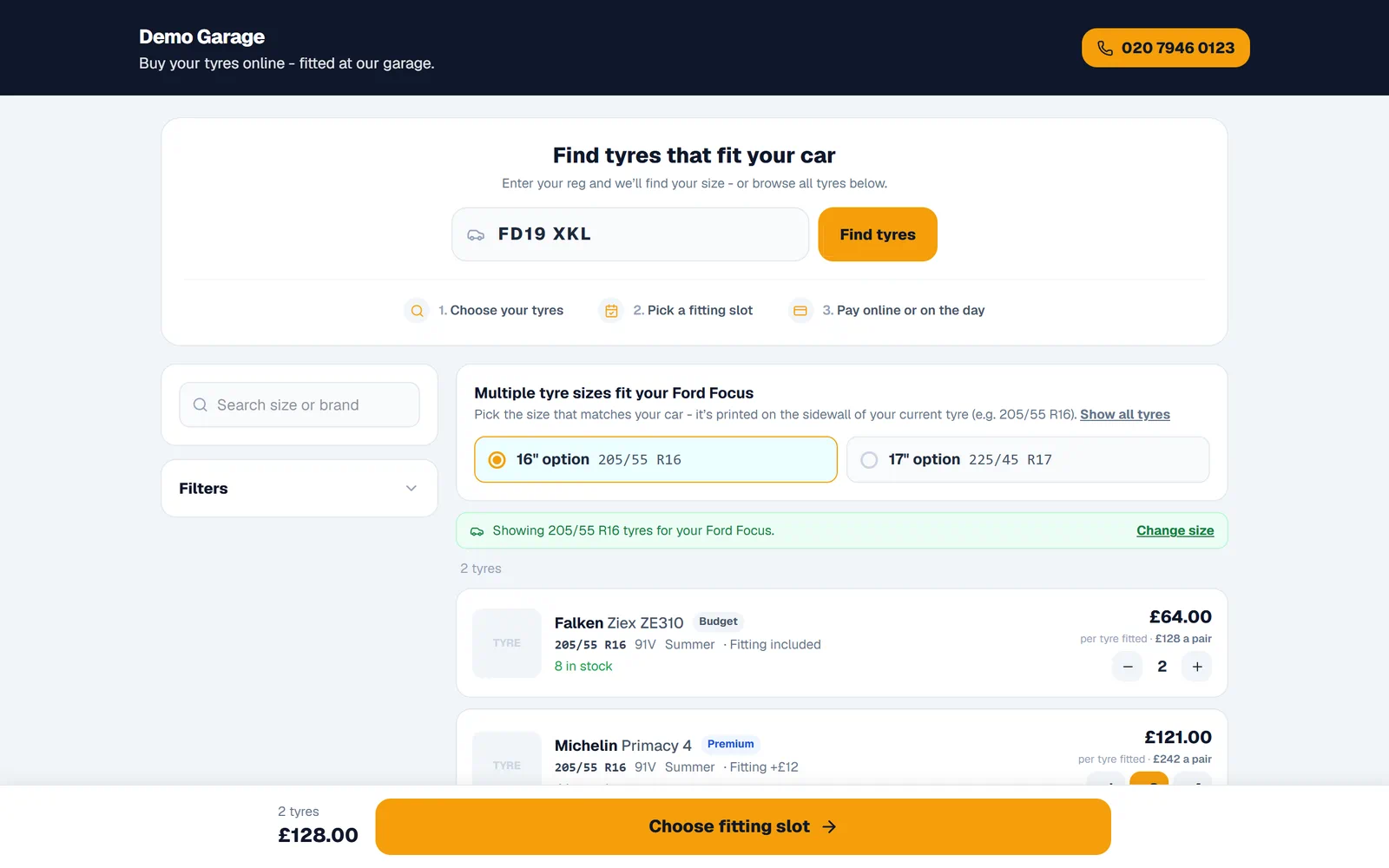
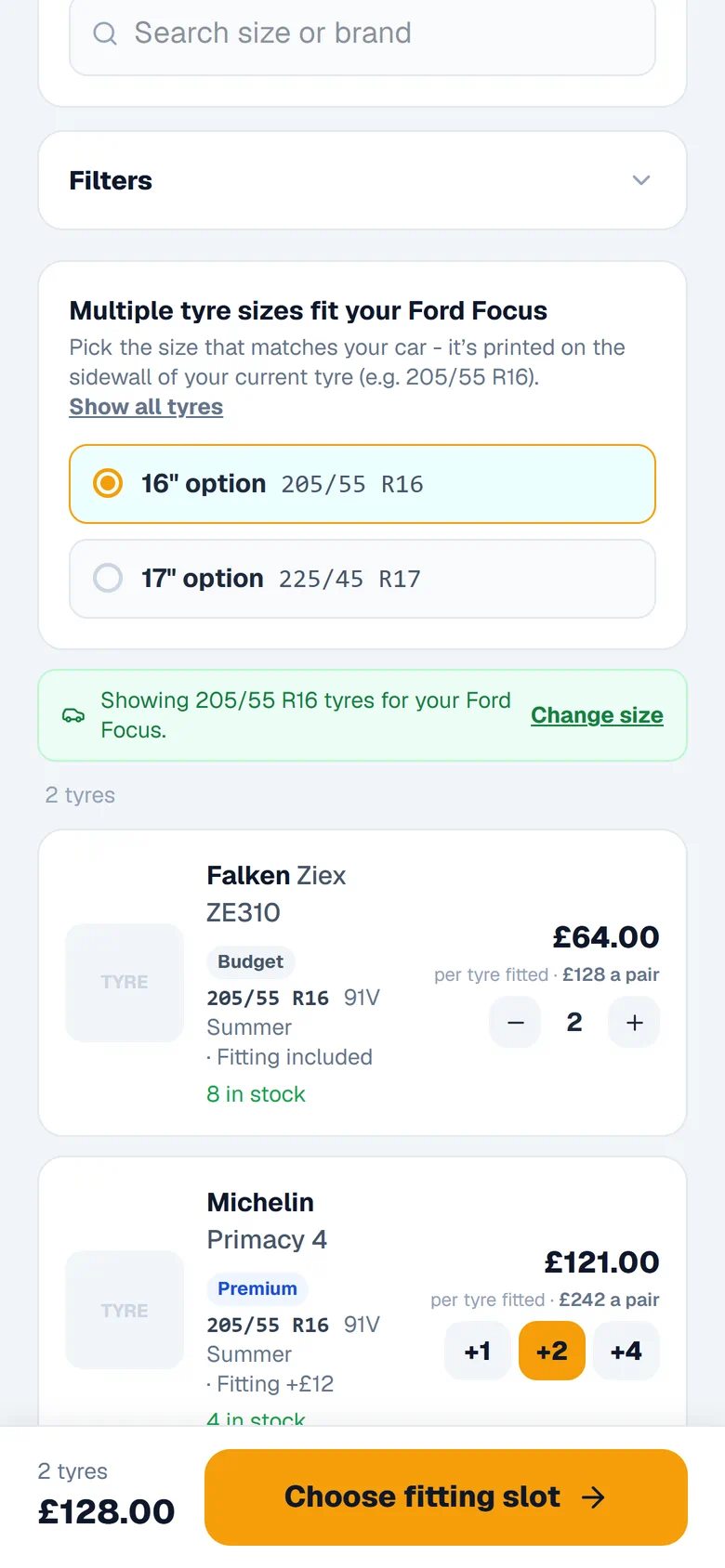
The page takes the customer through three steps: choose your tyres, pick a fitting slot, pay online or on the day. It starts with the reg. The page looks up the tyre sizes that fit the car: one size filters your list straight away, and when a car has more than one wheel option the customer picks the size printed on the sidewall of their current tyre. If no size comes back, they are asked to type it in.
From there they can narrow the list by size, brand, season and price, tick "Only show tyres in stock", and sort by price or brand. Once you list three or more tyres, "Budget", "Mid-range" and "Premium" badges are worked out from your own prices. If you stock nothing in their size, the page says so and asks them to give you a call.
Tyre fitting bookings and extras
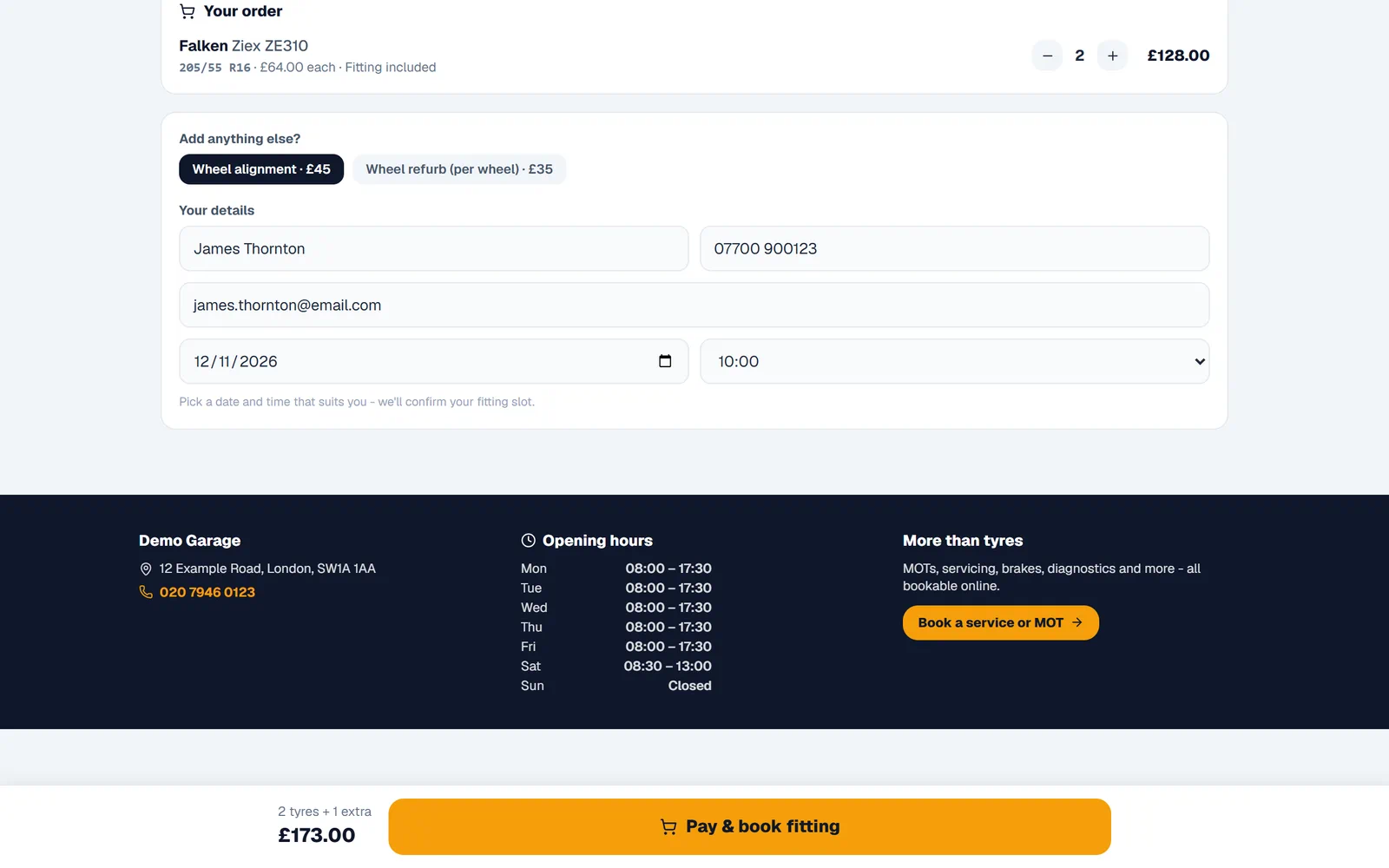
Fitting times are whole hours from your opening time until an hour before you close, taken from the opening hours saved in Settings, and days you close in your diary are left out. Save your hours before you go live: with none saved, the page offers 08:00 to 17:00 every day, Sunday included.
Before ordering, the customer can add extras from your services, such as wheel alignment, at the price on your Services page, then gives their name and a phone number or email. The order arrives as a pending booking marked "Unconfirmed" and named after the tyres, for example "Tyres (2)", with each tyre (its fitting included in the line) and each extra as lines on the job, ready to invoice like any other job (garage invoicing). Fitting times are not counted against your diary's per-time limit, so check the time when you confirm it.
The customer sees a booking reference on screen, and gets a booking made text (on Pro and Pro+) and email (from your own connected inbox).
Paying online, or on the day
Online payment needs your own Stripe account, connected in Settings > Payments and able to take card payments. When it is, and every tyre in the basket has "Customers can pay for this tyre online" switched on (it is by default), the customer can pay online by card when they order. The money goes to your Stripe account, less card fees (see pricing), and Stripe emails the customer a receipt when they give a valid email address.
Otherwise the customer pays on the day: the screen tells them their tyres are reserved and to pay on arrival, and the stock stays held for the fitting. If the card payment page cannot be started, the order is kept as pay on arrival. An order whose card payment has not come through yet is in your diary straight away as a pending booking with its payment pending: do not fit it until the job shows it as paid.
Your tyres, prices and stock
You list your tyres in the "Tyres" tab of the Services page, one at a time: brand and pattern, size, load index and speed rating, season, run-flat and extra load. Each tyre has its sell price, an optional cost price, and fitting either included in the price or charged per tyre on top. Add a picture if you like, and untick "Active" to hide a tyre without deleting it. The "Sell tyres" switch at the top of the tab turns the shop on.
Stock is counted per tyre. A customer can only add as many as you have, and an order takes them off in one step when it is placed, so two customers cannot both buy the last set. Tyres you have run out of stay listed, marked "Out of stock", unless the customer ticks "Only show tyres in stock". A low-stock level you choose puts a "Low" badge on the tyre in your own list.
Your own tyre page, or inside your website
Choose a web address for the shop in Settings, under "Bookings & Tyres": motionbookings.co.uk/your-name/tyres. It sits on Motion Bookings' domain, not your own. On its own it works as a small tyre website: your logo and name at the top with a call button, and your address, phone number, opening hours and, when you have services to book, a "Book a service or MOT" link to your online booking page at the foot. Unlike the booking page, this branded tyre page is open to search engines.
To put the shop inside your own website, copy the embed code from the same card and paste it into a page. The frame grows to fit the catalogue, so there is no second scroll bar. The Stripe card page Motion Bookings uses cannot open inside a frame, so when a customer pays from your website the whole browser window goes to the payment page, or they are given a link to it where the browser will not allow that. The embed code carries a small "Tyres powered by Motion Bookings" link under the frame, left off on Pro+.
Running a tyre business on Motion Bookings
The tyre shop is one part of the system that runs the rest of your work. Each tyre in your list keeps its own stock count, with a low-stock level you set. Online tyre orders land in the diary beside your MOTs, services and repairs, and each one becomes a job you invoice like any other. The customer's record holds their vehicles, bookings and invoices and, once you sell tyres, a tread depth check for each corner, flagged when it nears or falls below the 1.6mm legal limit. Mechanics can also rate the tyres on a vehicle health check.
Which plan, and what it costs
The tyre shop is on every plan: Starter £39, Pro £89 and Pro+ £149 a month for one location, with no extra charge for the shop itself. Online card payments carry card fees (listed on the pricing page), the booking made text to the customer needs Pro or Pro+, and leaving the credit line off the embed code needs Pro+. You can try all of it on the 14-day free trial with no card: start a free trial, or see the full pricing.
What the tyre shop does not do
- There is no import of a tyre stock file: tyres are added by hand in the "Tyres" tab, one at a time.
- There is no link to a tyre wholesaler's catalogue, price list or ordering.
- Stock comes off by itself only for orders placed through the tyre shop: for tyres you sell at the counter or put on a job yourself, change the count in the "Tyres" tab.
- There are no fields for the EU tyre label (fuel efficiency, wet grip and noise).
- There is no till, barcode scanner or card machine link: in the workshop you record a payment on the invoice as cash, card or bank transfer.
- The size lookup by reg needs an answer from the tyre data service. When there is none, the customer types their size.
- Fitting times follow your opening hours and closed days, but not your diary's per-time limit.
- The web address is on motionbookings.co.uk, not your own domain.
Frequently asked questions
Do I need my own website to sell tyres online?
No. The tyre shop works as a page of its own at motionbookings.co.uk/your-name/tyres, with your logo, phone number, address and opening hours. If you do have a website, you can embed the shop in it with the code from Settings.
How does the customer find the right tyre size?
By their reg. The page looks up the sizes that fit the car; if there are several wheel options they pick the size printed on their current tyre, and if no size comes back they type it in.
Can customers pay online, or pay when they come in?
Both. If your Stripe account is connected and every tyre in the basket allows paying online, the customer can pay online by card when they order. Otherwise the tyres are reserved for the fitting and paid on the day.
Can the shop sell more tyres than I have?
No. A customer can only add as many tyres as you have in stock, and the order takes them off your stock in one step. Out-of-stock tyres stay listed, marked "Out of stock", unless the customer filters them out.
Which plan includes the tyre shop?
Every plan, from Starter at £39 a month for one location, with no extra charge for the shop itself. Paying online carries card fees, set out on the pricing page, and Pro+ leaves the credit line off the embed code.
Can customers add wheel alignment to their tyre order?
Yes, if it is one of your services. The order step offers your services as extras at their listed price, and they go on the same job as the tyres.
Can I import my tyre stock?
No. Tyres are added one at a time in the "Tyres" tab of the Services page, each with its size, prices, fitting and stock count. There is no file import and no wholesaler feed.
Does it link to tyre wholesalers?
No. There is no link to a wholesaler's catalogue, price list or ordering. You keep your own tyre list, prices and stock in Motion Bookings and update them yourself.
Keep reading
Put your tyres online
Start your 14-day free trial - no card required.
Start your 14-day free trial